How to Prevent Double Booking Meeting Rooms
On this page
Your agent is bringing buyers into the office at 10:00. Another agent has promised the same room to a seller discussing an offer. With three meeting rooms and appointments already underway in the other two, reception has nowhere obvious to send them.
Before adding another reminder to the office chat, establish what actually reserves a room. A meeting invitation, a private agreement and a confirmed room reservation are different things. A workable process makes that distinction visible before people arrive.
Key takeaway: Prevent double booking meeting rooms by defining one authoritative booking record, making confirmation explicit and assigning someone to resolve exceptions. A second calendar cannot fix an unclear ownership rule.
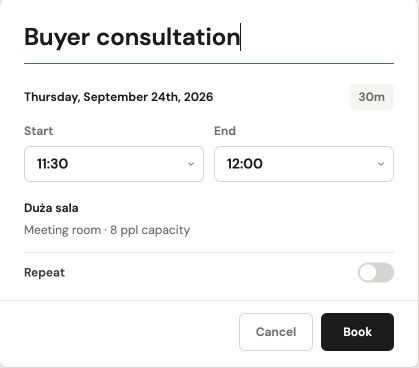
A room, a title and a defined time window. This is the booking form before confirmation.
Define what counts as a confirmed reservation
Choose the record everyone checks before using a room. It might be a shared room calendar or a dedicated booking system. The important operational rule is that a reservation exists there, against a specific room and time, with a named organiser.
Separate pending requests from accepted bookings. If a room needs approval, tell the requester whether they can invite attendees before approval and what happens if the request is declined. Silence should never count as confirmation.
Check the route from invitation to room record. If those are separate systems, identify who keeps them aligned. Do not assume changing the meeting automatically changes the room.
Remove the routes around the booking record
Side arrangements often create the hardest conflicts. An agent holds a room by phone between property viewings, reception promises it to a walk-in client, or a weekly sales meeting stays on the calendar after it moves.
List every way people currently claim space. Keep useful assistance, but require the person helping to enter the reservation in the agreed record. A receptionist can book on someone’s behalf without creating a separate source of truth.
| Situation | Ambiguity to remove | Suggested operating rule |
|---|---|---|
| Someone asks reception for a room | Whether a conversation reserves it | Reception records the booking and confirms the room and time |
| An organiser moves a meeting | Whether the old room is released | Verify both the new reservation and the old cancellation |
| A team wants extra setup time | Whether adjacent time is protected | Reserve setup and reset time explicitly |
| A recurring meeting skips a week | Whether that occurrence stays blocked | Cancel the unused occurrence only |
Check which steps your current system handles and which need a person.
Diagnose the conflict before choosing a fix
An actual duplicate reservation is different from a meeting running late. Both put two groups at the door, but they need different fixes.
For overlapping confirmed bookings, inspect how each was created. Look for duplicate room identities, an approval exception or a manual entry outside the usual process. For an overrun, agree when the previous group must finish and allow time for the next group to enter.
Do not treat an apparently empty room as permission to delete another person’s booking. The organiser may be delayed or preparing for visitors. Define a contact-and-release process with a short response window appropriate to your office.
When a client appointment overlaps a negotiation
Suppose you run a real-estate office with three meeting rooms. Your first agent has a confirmed buyer consultation from 10:00 to 11:00. A second agent phones reception to arrange a property negotiation at 10:30, but the reservation never reaches the room record. One other room is occupied; the third becomes available at 10:20.
Check both requests before the clients arrive. Keep the confirmed consultation in place and offer the second agent the third room, with ten minutes to prepare documents. Check that it offers the privacy and access the appointment needs. A free desk near reception is not an equivalent place to discuss an offer.
If the third room is unsuitable, contact both agents to agree another time or location. Do not ask clients to settle the conflict at the door, or interrupt a negotiation simply because the next agent is waiting.
Afterward, make one rule explicit: whoever accepts a room request records it before promising the space. Agents calling from a viewing should receive confirmation of the room and its full reserved period.
Keep the room booking in the agent’s Google Calendar
Your agents spend much of the day away from reception. Between viewings, they need to see a buyer consultation alongside the rest of their appointments, without copying the room reservation into a second diary.
In Venuo, each agent can connect their Google account from Account → Calendar. With that connection in place, their confirmed Venuo bookings sync to their primary Google Calendar. Changing a booking’s time in Venuo updates its linked event; cancelling the booking removes it.
For the 10:30 negotiation, the agent books the room in Venuo and sees that reservation alongside their other Google appointments after synchronization. Make room-booking changes in Venuo and allow the connected calendar time to update. When a client is already on the way, check the room’s current reservation in Venuo before confirming a last-minute change.
Give conflicts a predictable resolution path
Write down who can intervene and what information they need. An office manager should not have to reconstruct every incident from several chat threads.
Record the disputed room and time, both reservation references, organiser contacts, essential room requirements and whether either appointment can move.
Resolve the immediate problem first. Then check whether the cause calls for a booking correction, clearer guidance or a system investigation. Keep client names and negotiation details out of shared incident notes; room, time and organiser are enough to investigate the conflict.
Questions to settle before the next busy week
Should the earliest booking always win?
It is a clear default, but documented exceptions may be necessary. An alternative room that lacks required access or equipment is not equivalent. Have one accountable person apply exceptions and notify everyone affected.
Will software prevent every conflict?
A booking tool can support the process, but it cannot stop an unrecorded promise or an unannounced overrun. Evaluate how a tool handles overlaps, confirmation and changes alongside the habits your office needs.
Use the back-to-office room booking checklist to prepare the wider office, and review your recurring meeting room bookings separately. To explore Venuo’s approach, visit meeting room booking software.